
Hilton Points Pooling: How to Share, Transfer & Maximize Hilton Honors Points

PointsCrowd is a community-supported platform. When you apply for a credit card, make an order, or otherwise interact with the advertisers through the links on this page we may earn an affiliate commission. This helps us maintain and develop the platform further at no cost to you.
What is Hilton Points Pooling?
Hilton Honors Points Pooling lets you combine points with family, friends, or any other members you trust. Pooled points help you book faster — think five nights with the 5th night free — or reach luxury hotels that might otherwise be out of budget. A pool can include up to 11 people (one organizer + 10 contributors), and once contributions are made, the points are available immediately for any Hilton reward, including Points & Money bookings.

Pooling vs. Transferring (What’s the difference?)
Points Pooling: Create a pool and invite up to 10 members to contribute. Great for group trips and repeated sharing.
1:1 Transfer: Move points directly from one member to another (no “pool” needed). Handy for a quick top-up. Hilton treats them as separate tools, but both follow the same limits and increments.
Who Can Use Hilton Honors Points Pooling?
To use Hilton Honors Points Pooling, you gotta be a member for at least a month and have some kind of activity on your account (earning or using points). If you’re brand new and haven’t done anything yet, you’ll have to wait 90 days. Also, you need at least 1,000 points to play.
Know These Before You Start
- Transfers and pool contributions must be in 1,000-point increments.
- You can send up to 500,000 points and receive up to 2,000,000 points per calendar year (combined across Pooling + Transfers). You’re limited to six (6) outgoing transfers and six (6) pool contributions per year.
- A pool can include up to 11 members total.
- Transfers/pooled points are usable at transfer time, but may take up to ~24 hours to display in the recipient’s account.
- Hilton does not charge a fee to pool or transfer points. (Confirmed widely by major outlets; Hilton’s terms list no fee.)
- There is no limit on the number of pools a member can be in at a given time.
Hilton points expire after 24 months of no account activity. Make a qualifying earn/redeem to keep them alive. (Pooling generally shouldn’t be relied on as expiration-reset activity — earn or redeem instead.)
Step-by-Step: How to Pool Hilton Points
- Sign in at hilton.com → Hilton Honors → Points → Pool Points.
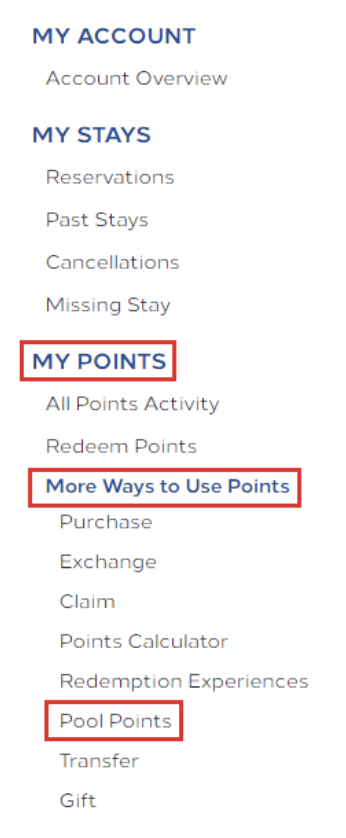
- Invite up to 10 people by name/email and specify how many points each will contribute (in 1,000-point increments)
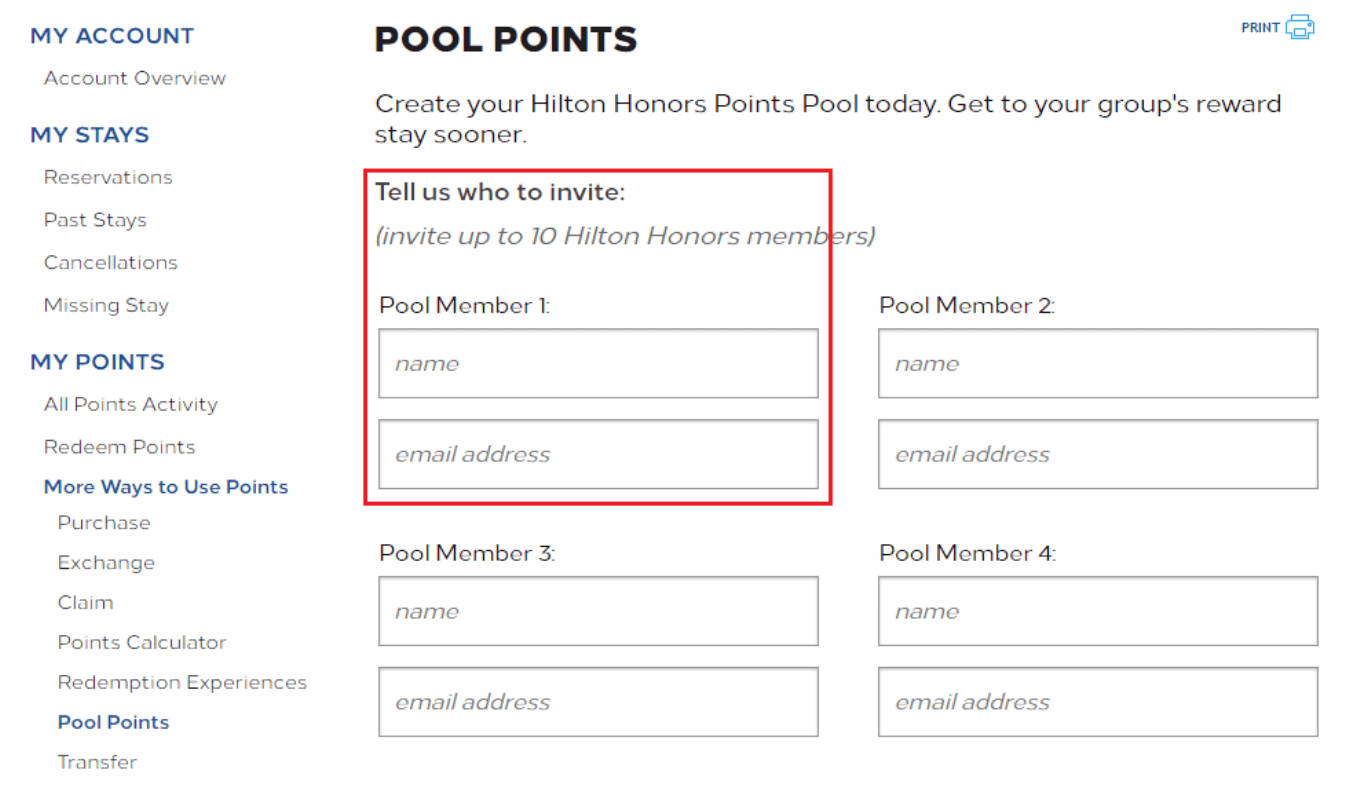
- Once contributors accept and transfer, the points appear in your balance (allow up to 24 hours to display). Hilton’s help center and Points hub outline the flow and where to click.
When Pooling Is Smart
Combining Hilton Honors points is great because it can help you get to a reward you couldn’t get by yourself.
A good example is the fifth night free deal on regular room awards. If you can get five nights in a row in one account, Hilton only charges you for four. It’s like getting 20% off each night. Combining points is the easiest way to do this, especially if two or three people you travel with have a good amount of points, but not enough on their own.
It’s also helpful if you’re trying to book a fancy hotel where the points needed per night are really high. Combining points lets you book that stay now, instead of waiting to earn more points.
If you like having choices, combining points before booking a Points & Money stay lets you use less points at first. This way, you still have some points left for another trip, instead of using them all on one booking.
Don’t forget about the restrictions: you can send up to 500,000 points and receive up to 2,000,000 points per calendar year, and you are limited to six (6) outgoing transfers and six (6) contributions to the pool per year.


